
I love trying new apps and tools. It’s honestly part of my personality at this point. But as someone with ADHD, most of them don’t stick.
These are the tools I actually use every single week. They’re not perfect, but they help me keep my life together. It’s just enough to manage my tech job, side hustles, my two dogs, a fiancé, and trying to be a functional adult with ADHD.
Whether you’re looking for new digital tools to try or just curious about what works for someone juggling a lot, here’s what’s currently holding my chaos together.
Notion
I started using Notion almost five years ago. The way I use it has changed a lot over time, but I keep coming back to it. It’s just such an effective tool.
Lately, I’ve been using it as a content creation planner. I also track my side hustle income, keep a list of the podcasts I’m listening to, and even built a digital library catalog. It helps me track what I own and what I’ve been reading.

Notion is beloved for project management and it’s easy to see why. There’s no shortage of cool templates people have shared. Some are paid (get that bag!), but there are also tons of free ones—especially if you’re just getting started. I’ve found templates that help me plan out posts across the different accounts I run. It saves me from having to build everything from scratch and keep the wave of overwhelm at bay.
My favorite ADHD-friendly feature is the synced block. It lets you create a text block on one page and mirror it on another. Whatever you write in one updates automatically in the other.
For example, I have a “Mobile Dump Page” for quick access on my phone. That page includes synced blocks linked to what I call my brainstorm blocks. It’s a space where I can jot down content ideas on the fly, even if I don’t have time to flesh them out. Later, when I’m planning posts, I already have a block full of half-baked ideas I can work from.
That said, Notion isn’t perfect. I still catch myself expecting the tables to act like Google Sheets or Excel. Spoiler alert: that’s not how they’re built. I also tried using it as a habit tracker, but the upkeep was too much for me to maintain consistently. I would find myself creating cool trackers, but then stop using them pretty soon after.
Calendars (Notion Calendar + Google Calendar)
Digital calendars are so crucial to my life that I use two of them: Google Calendar and Notion Calendar.
Google Calendar is my everyday go-to. I use it to repeat events, set reminders, and create different sub-calendars for different parts of my life. I can also add locations, which makes it super easy to pull up directions in Google Maps when I need them.
When I’m planning content in Notion, I like to have a rough idea of when I’ll post it. Adding a date to the post info syncs it automatically to Notion Calendar. That lets me see everything visually and across all pages at once.
Yes, it can look a little chaotic to have every post from every project in one view. But for my ADHD-coded brain? It helps to see it all laid out.
What I love about both calendars is how easy they are to adjust. I can drag and drop events or posts when plans change. Or when I change my mind. Or when I want to reshuffle the order of things. All of these can happen often.
Best of all, I can make updates from whichever device I’m using in the moment. Everything syncs, so I don’t have to mentally remember changes I made a few days ago.
You Need A Budget (YNAB)
I’m on a slow but steady journey toward financial freedom. My first major stop on that path is paying off debt.
I’ve been using YNAB (You Need A Budget) to help me understand where my money actually goes. I was hoping to include side hustle income too, but that part’s still a work in progress.
One of the first things I liked about YNAB is how easy it is to create categories. I made ones like “Dog Food and Treats” and “Eating Out.” Each month, I assign a budgeted amount to each. If I go over in one—like spending more than expected on Cindy Lou’s treats—I can just move money from another category (usually Eating Out) to make up the difference.
Even though I love YNAB, I did fall off for a month or two. I let over 100 transactions pile up without categorizing them. It felt overwhelming, and I started beating myself up for falling behind.
Luckily, I found their “Make a Fresh Start” feature. It let me reset from that day while still keeping all my categories and linked accounts. That meant I could give myself grace without starting over from scratch.
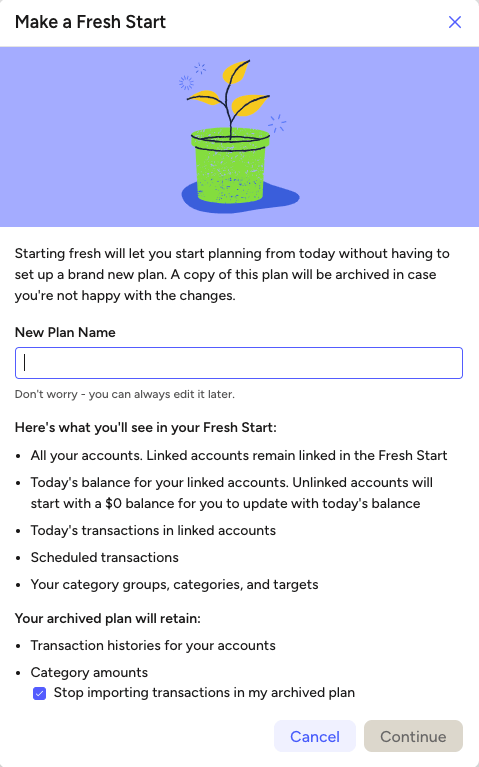
Since then, I’ve been using YNAB alongside a snowball debt payoff plan. It’s been working really well. I actually feel like I’m making progress without putting impossible pressure on myself. I’ll definitely keep you posted on that part of the journey.
Now, I won’t lie- YNAB isn’t the easiest tool to learn. It has a bit of a learning curve. But once you understand how it works, it’s absolutely worth it.
If you want to give it a try, here’s my referral link. If you subscribe after the free trial, we both get a free month!
That’s the current lineup. These tools help me stay organized, stay honest with my money, and feel a little more in control of my schedule, even when life gets messy.
I’m always experimenting, so if you have a tool you love, send it my way on TikTok @_melissazpd. And if you try any of these and they help, even better.
I’ll probably do a follow-up post with a few more tools soon, because you know I can’t stop playing with new apps.




 the bold dev
Leave a comment